Monday, August 31, 2009

Faithful in Little, Faithful in Much

aqua IIImage by filtran via Flickr
At church this weekend, Pastor Matt Fry continued his series entitled, "ReThink." The series talks about readjusting how we approach about our walk with God. Overall, it was good information.

In this entry, I will explore the idea of being faithful in the little things and the benefits that may follow.

In the Bible, Jesus shares a parable about three servants. He explains that a master is preparing for a trip and calls his three servants for a brief meeting. Before he leaves, he gives them each a number of talents, which is a form of money. The first servant received five talents, the second received two talents, and the third received one talent.

While the master was away, the first and second servant invested their talents while the third buried his under ground. When the master came back home, he found that the first and second servants doubled the amount of their talents. As a result, the master was very pleased and gave them more talents.

Unfortunately, the third servant did nothing and returned with the same talent that was entrusted to him. The master was thoroughly disappointed and cast him out of the house with instructions to never return.

The lesson I gained from this parable is that each of us are entrusted with something. It could be a gift of singing, accounting, or writing books. Beyond skills, knowledge, and abilities, we are also given authority over people and things. How we manage the little things often determines if we get to manage the bigger things.

To apply this in everyday terms, I look to something like a car or house. Many of us may remember our first car or house. Typically, we find ourselves wishing for the big house or fancy car, but only able to afford the base model. It is at this moment that we show the world what we are made of. How do you treat the less valuable things?

In the case of the car and house, do you take care of it? When it needs maintenance, do you make the necessary sacrifices to fix the problem or do you let it slowly fall apart? Do you find value in what you have or do you constantly wish for more?

If you are one of those people that appreciate the used car and treat it like a Mercedes Benz, then I applaud you. It is this type of person that washes, waxes, and even dusts the car. It does not matter if it has the best paint job or even runs all that well, this type of person treats everything they own with respect.

This behavior even runs into their business lives. Individuals who are diligent about treating everything and every opportunity as if it were worth a million dollars are good stewards of their gifts. Based on the story, we find that these individuals are given more because they were faithful with the little bit they had.

As we look to better ourselves, remember that everything from your health to your job is a test of faithfulness. If you can prove your ability to properly care and manage the little things in life then it is more likely you can manage the bigger things.

Therefore, if you ever catch yourself wishing for more money, bigger house, nicer car, more friends, and happier days, then take a look at how you manage what is given you today.

Until next time...

Saturday, August 22, 2009

Find a Quiet and Comfortable Place to Write

This afternoon, I finally moved a writing desk into my bedroom. After months of trying to compose a dissertation on the bed, I had enough. The constant switching of positions, from sitting to laying and back again, made writing a chore.

Knowing that I was going to spend the majority of the weekend behind a computer meant it was time to make a badly needed change. So far, the results are positive.

For starters, I am in a more comfortable position. With the use of an executive type chair, I can sit up and type or lay back and think. My legs no longer fall asleep and my search for extra pillows to support my back is now officially over.

I have set the desk in the quietest room in the house. During the majority of my doctoral program, I was able to escape into my man cave and write. However, with three growing kids and a small home-based business, the office slowly transformed into a daycare. This move turned me into a wanderer.

I tried using the dining room table, but it was too close to the kitchen. I was often tempted to make refrigerator pit stops and then later entertain others who did likewise. I tried the living room, but the foot traffic and house noise gather there. Overall, these distractions were enough to affect the flow of my writing. In some cases, I did not write at all.

As with most things, my greatest achievements come out of necessity. In this case, it is faced with a deadline and a drive to complete the doctoral program.

I share this entry to empress upon you the importance of a quiet and comfortable place to write. Remember, writing is an important aspect of our online lives as well as professional success. So, if you have not done so, take this opportunity to examine your existing situation. Is it a spot that will allow you to create freely or is it a place where you fight just to remain sane?

If it is the latter, I encourage you to find a spare room or closet and build an environment that will allow you to think clearly and explore those million dollar ideas.

Until next time...

Thursday, August 20, 2009

Function vs. Hierarchy within Higher Education Web Sites

The University of Cambridge is an institute of...Image via Wikipedia
With nearly 14 years experience in developing web sites for higher education, I have watched the changes in technology open doors for new and exciting things. Although, due to bureaucracy, many of those opportunities took longer to implement. In most cases, it was not due to a lack of technical prowess, but rather the ability to gain mass support from the campus. Major decision makers play a huge role in adopting change. If those individuals are not on board, then often little else changes until they are.

In this article, I would like to introduce a few issues I see with North Carolina Central University's web site and then follow up with a recommendation. While the subject may be higher education, I believe the problems and solutions are relevant to other types of organizations as well.

Common Problems

Poor Navigation
As it stands today, we get tons of complaints about finding information on NCCU.edu. To many, the solution is that everything belongs on the front page. Unfortunately, the front page has limited space. How can we deliver value and relevant content to customers with space constraints?

Different Looks for Different Departments
Each year, a number of departments seek to freshen their site's design. Over a period of time, the university's site looks like a virtual Frankenstein where each unit looks and acts totally different than the next. As users move between pages, they have to adapt to a new navigation and design. Not that I dislike other designs, but the university spends valuable resources trying to bring attention to only one department versus using resources to better promote the entire university.

Putting Everything We Own Online

Another issue the university runs into is overloading the web site with too much information that fails to bring value. Not that a manual or catalog is without value, but is it necessary to save every document from 1996 when the current information is all that is needed?

Recommendation
Times are changing and so should we. The way higher education web sites were built back in 1995 are not great examples of how they should be built today. Forget about what another school is doing for a moment and look at your customers. What do you see? What are they coming to your site for?

If you quietly thought or openly stated something about users seeking online services. Then you and I are on the same page. For years, I have watched web users come to expect more from our web site. In higher education, students should be able to register, pay bills, select roommates, find a tutor, and ultimately solve problems online. Instead, we still ask customers to call, email, or physically visit a department when, in many cases, this is not necessary.

No More Silo Mentality
When people talk about a new design or placing a link on the front page, I believe they are looking for more attention. From a departmental point of view, highlighting MY stuff is important and getting attention means more visits to my page. As the Web Service Manager, I totally understand the strategy. Unfortunately, I do not believe that a new design or front page link is always the answer. Instead, I think we need to look at a few other things: a) Centralize similar information and b) Focus on function vs. hierarchy.

Centralize Similar Information
The first thing departments should do is centralize similar content with information from other areas. Centralizing means bringing similar services together in a common place. If we take for example our current situation with jobs or employment opportunities, we find that a user needs to know which department is offering jobs and then where to find the department on the site. In order to do that, you have to know who the department reports to and the the location of that office online. Truthfully, that asks far too much of users.

Focus on Function vs. Hierarchy
This collaboration between different departments means that we now focus on function versus its place in the organization. To continue with our employment example, I would seek to pull all of the jobs, internships, co-ops, community service opportunities from across campus and centralize it under a meaningful name of employment. This means users only have to know what they want to do not who is in charge of the service.

There are benefits in adopting this method. One perk is a decrease in the number of pages we are required to maintain. We could potentially remove dozens of pages in order to deliver just one, users would not have search so hard to find information, and the campus would finally work together to meet customer needs. Because online services are interrelated, when one department does well, we all do well. As Derek Brinson would say, "All boats rise."

Additional Thought
The problem most universities have at this point, including us, is communicating this message to stakeholders. There are those departments that base their identity on the existence of a web page. I foresee resistance when you talk about taking away pages in order to group them together based on function. Additionally, Web Services needs to have the authority to make these types of changes without going through congress. We do not tell nurses, educators, or administrators how to do their jobs, so why do we allow others to dictate how we do ours?

One suggestion I received to overcome this challenge is to organize a Web Advisory Committee. This committee, which consists of high level decision makers, would meet regularly to discuss web priorities and serve as the enforcers of policy across campus. For Web Services, we get to develop a relationship with decision makers and provide guidance on the current web issues. Over time, these decision makers become advocates and help to support future goals. If you have no advisory group, consider adopting one.

I am curious to find how you currently handle these issues at your organization? Feel free to leave your response in the comments below.

Until next time...

Questioning the Best Use of Bundles in Google Reader

Image representing Google Reader as depicted i...Image via CrunchBase
This morning I am struggling with how to use bundles. On Tuesday, I wrote a how-to article on creating bundles in Google Reader. The process, while a little clunky, works but it revealed to me another problem. What should go into those bundles? Should it include only my work or a combination of my own contributions with the shared work of others?

If you look to Google for guidance, you will notice that there are about 449 bundles online. The topics range from news to yoga. Inside each bundle is a collection of web sites and RSS feeds from around the net. Most bundles created by Google hold between 4-10 resources. It does not sound like a lot but when you subscribe, the list of feeds can be overwhelming in number. Additionally, the range of topics coming from those feeds may not always correspond to the topic of the bundle. In very short order, your Google Reader stream may begin to look like a hot mess.

While I enjoy a good resource, I have reservations about allowing feeds an open faucet into my bundle. There should be some control. This leads me to my current situation.

The Two Options

Option One: Damond Nollan Only
The first option for bundles is to include only my feeds. As we learned in Breaking Damond Nollan Apart in Google Reader: Learn to Give Your Readers Exactly What They Want, I can separate my blogs, lifestream, pictures, videos, and audio into topics that automatically redirect into related bundles. Subscribers of option one will only get the stuff I share online.

Option Two: Damond Nollan and the Best of Shared Items
The second option is to include my own feeds, as described in option one, along with favorite finds from around the net. This could include Twitter, Friendfeed, YouTube, and Flickr finds along with my own blogs, images, video, audio, and lifestream.

I can see the benefit of option one being less noise and duplication. Because I subscribe to a number of well known feeds, the likelihood of duplicating someone else's share is great, assuming I share what I read. Whereas my own work is original and far less distributed, which means less noise.

Although, on the other hand, I like shared resources, which is one of the reasons we use applications like Delicious, Friendfeed, and now Google Reader. Our friends and associates filter through large amounts of information and share only the best. I know that many of my friends rely on me to find good stuff and share it with them. So, do you see my dilemma?

The bottom line is that I want to provide good information. There are some users that are only interested in what I do but then there may be others who value my shared finds. What to do? What to do?

Yes, I have thought about creating both a Damond Nollan only and shared bundle for the same topics, but then it seems a little much. I have not made a final decision, but curious to find what others are doing? What do you like/dislike? What would you do differently?

Thanks for any feedback you feel moved to provide. Trust me, I will read every response provided.

Until next time...

Wednesday, August 19, 2009

Web Development: Develop for the Test

Students taking a test at the University of Vi...Image via Wikipedia
Believe it or not, I was a music major in college. When I should have been practicing my art, I was in the computer lab learning HTML. I write that to say much of what I know about web development is learned through reading and experience. Today, I do very little development but a lot of management. Fortunately, I have an awesome team that is highly skilled and a pleasure to work with.

The reason for this article is to share with you something I learned recently. As much as I would love to say I know it all, I do not. Every day is another opportunity for me to explore this world and embrace a new idea, process, or perspective. This day, my eyes are set on new ways to create and insure quality in the programming.
More specifically, I would like to address testing. I know, it already sounds like a boring idea for a blog, but it is important. Trust me, as I watch my team spend countless hours creating awesome applications, I also recognize a need for quality assurance. We, as a team, need to know that our web sites are functional and user-friendly. To do this, we need to develop code and then test it. Sound good?

Well, there is one quick change I would like to make. Instead of developing code followed by tests, we should create the test first and then develop the code. Yes, it sounds backwards, huh? No worries because I thought the same thing when I first heard about it. The idea behind creating a test before we code is simple, it is to guide developers toward being done. One of the most popular questions I get from them is, "When are we considered DONE? My answer is when the application passes the test.

What goes in a test case?
That is a very good question and it really depends upon the type of test you choose. If the test case is used to check the applications functional components, then write the test to highlight the steps and the expected results. The test will pass if the results meet your expectation.

In the case of a usability test, one would develop a series of tasks that an innocent user would be asked to complete. An example would be to fill out a specific form, find a particular page, or locate the companies mailing address. The objective is to observe the user and identify any areas that could benefit from additional attention. The result is a better understanding of how users navigate the application, which leads to a more enjoyable user experience.

Conclusion
As you think about your next project, seek to understand the success criteria and put those into a test case. Give it a try and let me know how it works out for you.

Until next time...

Stay Motivated and Get Stuff Done Using a Timebox

A Westclox Big Ben ClockImage via Wikipedia
My life is extremely busy and I can only imagine that you have a similar experience. In this entry, I would like to spend a few minutes sharing how you can get stuff done while staying motivated. Do understand that I am an expert procrastinator. I would much rather do meaningless things then spend my time completing valuable tasks. It is not that I do not want to do them, it is just that I do not want to do them now. The intention is always there, but the execution needs some attention.

In the following sections, I will address how I get stuff done both in my personal and professional life.

Make a List
Yes, this is probably one of the most repeated steps in self-help articles, but it works. Pull out a sheet of paper, napkin, empty envelope, or cardboard box. It does not matter what you write this list on, just do it.

Prioritize
Once you make a list, it is time to organize the list in priority order. I often start each morning by placing a number behind tasks. You can put a number in a circle, square, or triangle. The method you use to prioritize is not as important as getting the highest valued item done first. Whatever works for you, get the list in order.

Timebox the Task
Now that the list is in order, review the top tasks on your list and decide how long it will take to complete that task. Place the time near the task. For ease of planning and execution, let us say that no task should go over one hour. If you think the task will take more than one hour, simplify the task until it is something you can finish within sixty minutes.

Ready, Set, Go!
With a to-do list organized and timeboxed, you are now ready to begin. If needed, pull out a stop watch or online alarm clock and start knocking off tasks. The more you get done, the more motivated you will be to finish other tasks.

Closing Thoughts
The idea of timeboxing is to simplify tasks. I, for one, get extremely tired when I think about writing this doctoral dissertation. I know that it is a huge project, but if I look at it as a bunch of fifteen minute papers, it is much easier to get started (and finish). Getting started is often the most difficult step in the process.

I can hear someone asking the question, "What happens if I do not finish within the time allotted?" At this point, you may stop, but if you feel ambitious and do not have anything more important to do, I say continue. If you find that you go over the allotted time a lot, then consider simplifying the task even more next time. Remember, we want to stay motivated by knocking stuff off our list. If the task gets too heavy or tedious, one is liable to quit.

I am interested in hearing how this works for you. If you have a story, please feel free to share in the comment section below.

Until next time...

Tuesday, August 18, 2009

Breaking Damond Nollan Apart in Google Reader: Learn to Give Your Readers Exactly What They Want

Google Reader Fluid IconImage by indiekid via Flickr
This entry has been inspired by Dawn Douglass' The Hive, Wallace Lockhart, and a thought provoking comment by a reader named natbas. After writing Sharing Images, Maps, Videos, and More with Google Reader, I was challenged to explore ways to share myself so that readers would not have to filter through topics they have little to no interest in. For me, it would mean that I could continue exploring many different areas without boring the other half of my audience.

For example, I have family members that want more pictures of the kids and every day news about my life. For those interested in web technology, business, or higher education management, this is type of content means very little to them. So, to give users exactly what they want, we need to start pushing content that matters to them without all the noise. With Google Reader's feeds, bundle, and tags, I can separate my blogs, pictures, comments, videos, and audio clips into categories people find interesting. So, without any further ado, let us begin.

Pull Feeds
The first step in this process is to subscribe to all of your feeds. Using the RSS Icon found on most pages, you should visit your Flickr, Picasa, YouTube, Posterous, Tumblr, or blog and click on the RSS link. Depending upon the service, you should receive the option to select Google Reader as your tool of choice.

Tag Each Item
Once Google Reader begins pulling in the feeds, the next step is to tag each entry with key words. Examples of tags include: technology, investing, religion, fatherhood, and higher education. Think about these tags as general content areas you plan to share. The Edit tag button is located on the bottom of each item in your feed.


Subscribe to the Tag
Once you have feeds tagged, now it is time to subscribe to them. To subscribe, simply click on the tag, which is located in footer of each shared item. By clicking on the tag, Google Reader will filter all shared items and list them on its own page.


  1. From this page, click on show details in the upper right hand corner.
  2. Once clicked, the page will open to show Feed URL and a graph. Copy the Feed URL.
  3. Click on Add a subscription in the upper left-hand corner of Google Reader.
  4. Paste the URL that you copied from the address bar.
  5. Click Add.
Create Bundle
Now that you have tagged items and subscribed to them, it is time to create a bundle to hold them. To create a bundle, do the following:


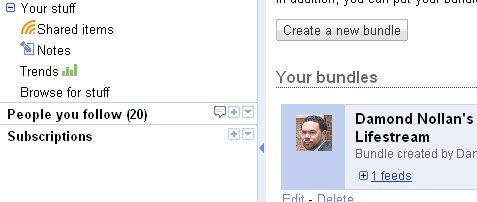
  1. Under 'Your stuff' in Google Reader click on 'Browse for stuff'.
  2. In the bottom right hand corner, click on 'Create a bundle.'
  3. Once the new page loads, type a name and description for your bundle. Note: name the bundle something descriptive. If I use Technology as the name of the bundle, then users can expect nothing but technology items.
  4. Now, review your related feeds in the Subscription window and drag them into the bundle window.
  5. Once you have added all of your feeds, click on the 'Save' button.
  6. Repeat this step for each category you plan to share.

Now, anytime you use tags on your shared items (videos, images, audio clips, text, blogs, and etc.) they will automatically route their way into your created bundles. Cool, huh?

Public or Private?
There is a way to control the publishing of content in a private or public way. To control access, do the following:


  1. Click on Settings in the upper right-hand corner of Google Reader.
  2. Click on the Folders and Tags across the top.
  3. All of the bundles will rest in alphabetical order. Navigate to your bundle.
  4. To the right of the bundle is a trash can and grayed out RSS icon with the words Private or Public.
  5. To change the privacy setting, just double click on the RSS icon.
  6. If setting is public then you should see the link to the public page on the right-hand side.
Want more information on subscriptions? Try putting your feed into Feedburner.

That's all for now. I hope this helps you deliver a more enjoyable experience to your readers.

Until next time...

Sunday, August 16, 2009

Sharing Images, Maps, Videos, and More with Google Reader

Image of Google Reader from TwitterImage of Google Reader
Today marks day two of my Google Reader exploration. In this entry, I would like to address the question about Google Reader's ability to share more than just text. This is a hot topic on Friendfeed, as well as Reader, so let's dive right in.

Thanks to Vince DeGeorge, Hanna Wiszniewska, Matteo Farber, and the many other inquisitive Google Reader users, we have found that you CAN share images, maps, videos, and even audio clips into your Google Reader stream. While it may not be as intuitive as Friendfeed, it does work.

Get the Note in Reader Bookmarklet
The easiest way to begin is by using Google Reader's 'Note in Reader' bookmarklet. To get, do the following steps:


  1. Visit Google Reader
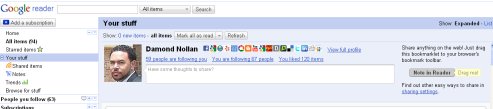
  2. Click on Your stuff (located on the left hand side)
  3. Once the page loads, you should see the Note in Reader
  4. Drag the Note in Reader button onto your browser toolbar
Sharing
Now that you have the bookmarklet in your browser's toolbar, it is time to start finding interesting content. In many cases, you will want to share blogs and news stories. At most, this means sharing the URL, Title, and brief summary. To accomplish this task, just highlight a paragraph on the page you want to share and click the Note in Reader button. At this point, you can edit the summary and add a comment.

Sharing Things Other Than Text
This is really where many Friendfeed users are struggling. They want to continue sharing images, video, and audio clips like they can do now. To accomplish this task, we have a couple of options. We can:


  1. Embed the code
  2. Highlight the object
  3. Use HTML
Embed the Code
On many of the popular sites (e.g., YouTube, Flickr, Picasa, and etc.), users can copy an embed code and paste it in the Note in Reader form. When you hit the Post item button, it will automatically share the item in Reader.

Highlight
Similar to sharing text, you can highlight text and images and then hit Note in Reader and it will automatically populate the window.

HTML
For those with a little HTML skill, you can also write a link to multimedia directly in the Note in Reader form.

I, and a number of others, have tested each of these options with success, whereby making Google Reader even more powerful than many initially thought. As you can tell, the wonderful people exploring Reader are pressing the limits each day. If you find any other great tips, please feel free to share them.

Until next time...

Woopra: It's Like Google Analytics But In Real-Time

Suanie's WoopraImage by suanie via Flickr
I can be impatient when it comes to many things. Let's see, I do not like waiting in line at the grocery store, slow drivers on the highway, or web analytics that refresh every 24 hours. Do not get me wrong, I love the reports of Google Analytics, Feedburner, and Adsense, but I dislike having to wait for them. Are you like that, too? If so, I think I have at least one solution that you may like.

The name is Woopra and it is a real-time tracking and analytics application. Now, before I begin, let me preface this post by saying that I have only used this product for a little less than a week. However, I do see Woopra, even in its beta version, as a very valuable tool that provides instant feedback on the health of your web site or blog.

Do understand that the application is in beta and users will have to request approval from the company. It only took a couple of days before I received a key code, but Woopra is worth the wait.


Similar to Google Analytics, users will have to insert a few lines of code near the closing body tag on pages you seek to track. This process only took a minute to do. After that, you will need to download the reporting tool to your desktop. There is a version for Windows, Mac, and Linux.

Once you have installed the desktop application, inserted the lines of code into your page, and entered your approval code, you are ready to go. Within seconds, you will be able to see a live reading of visitors to your site. You can review a wide variety of data ranging from country of origin to referrers. So far, I am very happy with the application as it provides me with an up-to-the-minute view of my sites progress.

As of today, the beta version is totally free and uses around 56k of memory. The Woopra site reports that once out of beta they will offer a free and paid version. Assuming there are no surprises, I would be willing to pay for this type of service.

If you are interested, take a look and let me know your thoughts. Do you think this is something Google Analytics would be willing to do? Would you be willing to pay for a similar service?

Until next time...

Saturday, August 15, 2009

Lifestream with Google Reader's Bundle

Image representing Google Reader as depicted i...Image via CrunchBase
Today has been such an exciting day with Google Reader. Earlier, I asked the question, 'Could Google Reader Become the Next Friendfeed?" after I learned that we can build a conversation around shared items and individuals' thoughts. Since that time, a number of us have been connecting online and talking about our experiences. It has been a blast.

In this entry, I would like to explain how you can Lifestream using Google Reader's bundle. If you are new to Lifestreaming, I wrote about it in a previous blog entitled, 'Save Yourself: Learning to Lifestream Using Posterous.' Like many of you, I am a newbie to Lifestreaming, so do not feel like you have missed the boat. Based on what I know today, it seems to be a growing trend.

To summarize the concept behind lifestreaming, it is a centralized place where all of your thoughts, pictures, videos, audio clips, and blogs end up. They can originate from Blogspot, Picasa, Flickr, YouTube, Wordpress, or any other place on the web. For friends, family, and followers, they only have to go to one place to see all of your web activity. It is a brilliant idea.

In a time where web sites are closing, merging, or changing, it is a much safer bet to diversify all of your content. Should one site go down, you do not lose everything you ever worked on. Just find another source and keep going.


Google Reader now allows you to pull all of your RSS feeds from other sites and bring them together in Reader. This collection of blogs and web sites is known as a bundle. To create, do the following:


  1. Visit all of your favorite web sites and create a feed by pressing the RSS icon and selecting 'Google Reader.'
  2. Under 'Your stuff' in Google Reader click on 'Browse for stuff'.
  3. In the bottom right hand corner, click on 'Create a bundle.'
  4. Once the new page loads, type a name and description for your bundle.
  5. Now, review your feeds in the Subscription window and drag them into the bundle window.
  6. Once you have added all of your feeds from around the web, click on the 'Save' button.
At this point, anyone using Google Reader can subscribe to your bundle and receive activity updates from all of your favorite sites. Give it a try and let me know how it works out for you.

Until next time...


Related Articles

Could Google Reader Become the Next Friendfeed?

Image representing Google Reader as depicted i...Image via CrunchBase
Thanks to Stefan Svartling and Hanna Wiszniewska, new friends in Google Reader, I just learned something new. As many of us know, Google Reader has made a number of changes this past week. One of my favorites, although I do not use, is the 'Send To' feature. Simply put, I can send Google Reader items to external pages like Twitter, Friendfeed, Posterous, Facebook, and many more. It seems the list of places I can send items is growing each day. To clarify, I do not use because I have Friendfeed set up to do the work for me.

Another popular feature is the 'Share' button. With one click, I can share an item with those who follow me on Reader and, with Friendfeed's help, those on other sites. The process allows me to offer my friends a plethora of interesting finds. That is all well and good, yes?

Well, Google Reader just got better, at least for me. This afternoon, I found that I can hold a conversation around an item or thought. What does that sound like to you? If you said, "Friendfeed" then we are on the same page.


By clicking on 'Comment view' under 'People you follow,' I can see a list of conversations made by Google Reader friends. This is such an exciting development that I had to share it with you. Be aware that you should begin this step by creating groups in Gmail's contact area, and then add your Google Reader friends in those freshly made groups. As I understand it now, and its a little foggy, doing this will allow your friends to see each others posts and ultimately hold conversations. Cool, huh?

With this new information, and existing Google Reader tools, I can continue to connect with friends and receive good information all at the same time. Give it a try and let me know what you think.

Until next time...

How Often Should I Post A Blog?

Image representing Blogger as depicted in Crun...Image via CrunchBase
I often struggle with this question, "How often should I post a blog?" To some, this may sound like I am seeking permission to write less, but on the contrary, I would like write more. Here, let me explain.

On Thursday, I spent a few hours typing out a masterpiece of a blog. I cannot tell you how long it was because I have not gone back to review it. I simply wrote it and moved on. I think the major set back is now on editing. I do not have the drive to revisit the novel and work on it. It is just too monstrous.

This leads me to an observation I had this morning. Ok, I let me be fair, this is an on going observation I had after reading Dave Winer's blog. On many occasions Dave writes short pieces. He writes what he thinks and moves on. That is so attractive but I feel weird about it. I guess I expect blogs to be long essays that mimic academic papers, only written in every day language.

In an age of microwave cooking, YouTube, Twitter, Scrum, and a very busy schedule, I feel like I have a short window of opportunity to get something done before I am bombarded with new to-do items. This includes blogging.

I enjoy writing. However, I am finding blogging to be very time consuming. With a dissertation in need of serious attention, a family of five, and a rapid influx of technology news, I need to remain nimble. To write more often but accept that not every blog needs to be long winded means that I can address life in real time.

I don't know how this will work out, but I thought I would give it a try.

Let me ask, do you have any rules on blogging? Do you try to write once a day, once a week, or whenever the passion hits you? I would like to get your feedback on this.

Until next time...

Tuesday, August 11, 2009

Lessons In Grocery Shopping: How You Too Can Save Over $2,000 A Year By Clipping Coupons

Grocery Store Green Bell PeppersImage via Wikipedia
Growing up, I thought cutting coupons was either a waste of time or something reserved for penny pinching mothers. When I looked through the Sunday paper, my interest was more towards the comic strips or crossword puzzles, not in saving money. If only I had known the value and fun I could have experienced, it would have been much different for me. In the spirit of Ramit Sethi, I Will Teach You To Be Rich, I would like to spend a few minutes sharing my basic knowledge of coupons and how to save a considerable amount of money.

The Story
A few months back, I decided to take the responsibility of grocery shopping. A little known secret, I actually like shopping for food. I also like cooking. The part I dislike the most is washing dishes.

Anyway, I took it upon myself to take the job. To bring home the bacon, I made a comprehensive list of items that we needed. Before I left, I made certain to ask everyone for their final approval. "Is this everything?" I asked. Once complete, I jump in the car and headed to the store.

I grab a cart, fill it up, and head to the counter for my final descent. I watch as the items are scanned and immediately bagged. The sound of crunching numbers and dollars signs soon alarms me. "It can't be too much." I thought. That was until the cashier pressed the final button and I was floored. I looked around the store, looked over at the few bags in the cart, and then asked if that number was correct. I asked if she could read the dollar amount again, because my eyes were playing tricks on me. Reluctantly, I pulled out my card, swiped it, and approved the purchase.

As I slowly walked back to my car, I imagine all the things I could have bought with that money. Where did I go wrong? I mean, I made a list. I follow the list and did not buy anything outside the staple items (meat, dairy, fruits, and veggies). There were no treats of any kind. I was confused.

It was at that moment that I realized how expensive groceries were. During the course of the month, I can easily spend more for food than I can on any other single expense, outside of the mortgage. Something had to change.

Let Me Introduce Dollar Saving Vehicles
In the time of struggle, we find ways to adapt. I knew that my spending habits had to be brought under control. The first stop was a grocery store discount card and the second was a book full of coupons.

Discount Card
Most grocery stores have a discount card. Typically, you can find them on key chains or in wallets. Discount cards are free and readily available, you just have to ask. At Food Lion, where I spend the most money, they post notices near food that highlight MVP items. MVP is another way of saying "sale" IF you have a card.

Coupons
Yes, coupons are paper ads with a bar code. To use, one has to take a pair of scissors and cut them out of the Sunday paper. You might find a dollar amount ranging from ten cents to a couple of dollars. It just depends.

The Strategy for Keeping More Money in YOUR Pocket
The idea of owning a discount card was not too bad. I liked knocking off a few cents every now and then. The problem for me was cutting coupons and bringing them to the cashier. It just felt cheap. It's like bringing a jar of pennies to pay for stuff. As a man with a decent salary, I should not have to do it.

Once I put the ego down and realized that I am saving SERIOUS MONEY, the idea of was not so bad. So, if you feel like that, just trust me and know that I have your best interest at heart.

Where do I get Coupons?
There are a lot of places you can go to find coupons. Once you become more aware of their value, the sooner you will begin to see them everywhere you go. For starters, I tend to find coupons in:


  • Sunday paper: Typically, they are bundled with store advertisements and comics.
  • Online: My two favorite spots are Redplum and SmartSource. I found these are also the same companies that provide coupons in your local paper. Although, the ads you find online are not always the same as the ones in the paper. This means more opportunities for you. Please note that you will have to print these coupons from your computer, which usually requires a small application download.
  • Grocery isles: There are a ton of coupons that you can find near the items. I have found coupons in automated machines or a simple box holders.
  • Cartons, Containers, and Labels: Another resource is directly on the item's container. Inside cereal boxes, canned good labels, or redeemable stickers on the wrapper. Once you start looking, they will start showing up everywhere.
  • Manufacturer Sites: This last source is a little time consuming, but has potential. Go to the web site of your favorite product and join their mailing list. Doing this will add your email address to their scheduled mailings for special offers. They send stuff to you for a change.


Which coupons should I clip?
Clip or save coupons for items that you would normally buy. If you buy stuff just because it is on sale, not because you need it, then you may overspend on discounted items. Manufacturers often use coupons to entice customers to buy new or lagging products. Like normal, be smart about what you buy. If you think you might be interested in the product, go ahead and save it.

What should I do with coupons after I clip them?
Save all coupons in a handy pouch or notebook. It should be easy enough to carry around or place in the cart while you shop. Additionally, it should easy to open and organize on the fly.

Can we shop now?
Armed with a grocery list, pouch of coupons, and belly fully of food, it is time to shop. The secret is to take your time and compare deals against the shopping list. This means when it is time to buy cereal, look at all of your options, compare prices, sizes, and price per pound. Buying in bulk may mean more money upfront, but more product per pound. Written another way, you get more stuff or less money.

After a complete scope, identify your best deal. The best deal typically falls under a store or generic brand. At this point, you have to decide whether or not you can manage with something other than the highly advertised product. In my opinion, store brands are very competitive and often hard to tell a difference.

With your best deal in mind, take out any relevant coupons and begin your calculations. As you subtract coupon amounts from national brands, take into consideration MVP points as well. When done right, you can double or triple the savings by using the coupon on top of the in-store sale or discount card price.

During my last visit to the store, this is exactly what I did. My bill was over $130 before I introduced the discount card and coupons. As a result of the aforementioned strategy, I saved over $40 and could have even saved more had I brought a few other coupons from home.

If we use this savings as a guide, you can potentially save $160 per month and $2,080 a year. Not too shabby, eh?

Final Words
Saving money is important. I have seen unplanned events creep in and devastate family savings. While cutting coupons is not the end all, be all solution, it can provide some aid in this shaky economy. I don't know about you, but an additional $2,000 a year in an investment or retirement account is not bad at all.

I hope this was helpful. If so, let me know.

Until next time...

Monday, August 10, 2009

A Game Changer? Facebook Acquires Friendfeed

Image representing FriendFeed as depicted in C...Image via CrunchBase
This just in, Facebook announced its agreement to acquire Friendfeed. This is exciting news but the implications are unclear. For those who know very little about Friendfeed, let me introduce you. Friendfeed is a social networking web site much like Facebook and Twitter. Users can sign up and share information with friends or followers on what they are doing at that moment. That is where the similarities lie, but Friendfeed can do much more.

One of the earliest features that attracted me to Friendfeed was its ability to pull feeds from other sites and push them out. This means I can connect Facebook, LinkedIn, Google Reader, Yelp, Upcoming, Delicious, Britekite, Flickr, Netflix, YouTube, Picasa, Pandora, Twine, Digg, or any other service to Friendfeed and share all of my activity with friends, automatically.

Friendfeed has become such an important part of how I share content with people. In a recent article, How to Share Interesting Stuff from the Web Using Google Reader and Friendfeed, I point out just one of Friendfeed's valuable functions, but the number of uses is based on your creativity. Just today I read an article by Zee entitled, "Do we really need Favoriting AND Retweeting on Twitter? Combine the two like this:" In it we learn how Robert Scoble shares his Twitter favorites on Friendfeed, which ultimately gets published back out to his friends. I must say this is an ingenious way of maximizing the technology.

Beyond sharing activity from all of my services, I can also engage in a conversation about that activity directly on the site. Unlike most other networking sites, Friendfeed functions in real-time. This means, anytime someone responds to a discussion or post, it jumps back to the top of the list. I no longer have to search through a stream of content to find what is new or popular amongst my friends. Friendfeed delivers it right to you.

In addition, Friendfeed encourages you to post images, videos, and audio directly in the feed. Twitter can only provide links, Friendfeed gives you everything right there. It should go without saying, but Friendfeed is a wonderful application. Unfortunately, it lacks one very important piece of the puzzle. Friendfeed has not attracted many of my friends. While I share content with a couple hundred people, I miss the engagement with my friends and family, something Facebook does exceedingly well.

I always thought that if Friendfeed could make their service attractive enough to get my people connected, then it would be a more enjoyable place to play. As of now, I visit Friendfeed to read the latest news and follow favorite technology bloggers, but that is it. For everything else, I go to Twitter and Facebook.

Right now, the news of Facebook acquiring Friendfeed is exciting because they both are powerhouses and together they should be able to build something even better. My hope is that they will maximize on each other's strengths and raise the bar even higher. I guess in time we will see just how beneficial this union will be.

Let me ask you. How will this change social networking as we know it? What are some of your wish list items? I would like to hear your thoughts.

Until next time...

Saturday, August 8, 2009

The Secret to a Tidy and Well Maintained Home or Office

Unwashed dishes in a sink; an authentic situation.Image via Wikipedia
There are times when I look around my house and wonder how it got in such a sad state of affairs. In 2007, the house was brand spanking new. Today, I have a broken dishwasher, staircase, and possibly an air conditioner. Did I mention the walls could use a few touch-ups as well? With three kids the house has taken a beating. On a daily basis we also wrestle with dirty dishes, unfolded clothes, and toys in disarray. How did it get this way?

The answer to the question is not hard to find. In fact, I am a contributor to the problem, but I am not alone. No, the kids play a huge part in how fast the home turns from an organized palace to a domestic mind field.

What I am going to share with you is what my mother used to tell my sister and I. She would say, "when you are done with it, put it away." Then she would follow up with, "If you would have done it right the first time then you would not have to do it again." Has anyone ever told you that? (slowly raising hand)

Now that I am grown and raising three kids, the message could not be more true. If you would only put stuff away when finished, you can avoid going back later to clean up your mess. Going back means you have to pick up/organize everything you did not put away after use. Based on the time you last did this and the number of contributors, it could be a serious undertaking.

To test my mother's theory, I simply watched how the family normally operates over the course of a day. I watched as individuals left cereal boxes, shoes, toys, unmade beds, toiletries, newspapers, yesterday's clothes, computers, game boys, and dishes laying around or unkempt. As the day wears on, it only gets worse.

It never dawned on me how important a clean/organized home is until I began working. The home can either be an oasis or a prison. It can serve to rejuvenate you or add more stress. The decision is yours. To avoid a desk full of papers, a sink full of dishes, a bed full of clothes, and a floor full of toys, simply put it away when you are done.

Remember: "A place for everything and everything in its place." Go forth and have a wonderful day, one organized item at a time.

Until next time...

Thursday, August 6, 2009

Twitter: To Follow Or Not To Follow, That Is the Question

New User Interface Coming to FriendFeedImage by Thomas Hawk via Flickr
By now, you may be aware of a movement within the Twitter community. Let us call it The Great Unfollow. I first learned about it from Robert Scoble who posted an announcement on Friendfeed. He wrote that he was in the process of unfollowing 100,000 people. I was confused. What do you mean you are going to unfollow 100,000 people? I thought. Why? I asked.

Scoble responded, "Damond: only on twitter. Twitter has become overrun with spam and noise. It's a huge change from a year ago. Autofollowing made it worse (I tried to do that for DM reasons, but DMs now are full of spam). Anyway, this gets Twitter manageable for me again. - Robert Scoble"

You must understand that Scoble's original theory on following everyone made perfect sense to me. In fact, after months of maintaining a small number of follows, I decided to follow his lead. Days into my campaign, he tells the world that he was wrong and Loic was right. Following 100,000 was not the gem he once thought it was, but what does that mean for the rest of us? Should we take his experiences and embark on the Great Unfollow, too?

In this article, I would like to look at the pros and cons of this decision, maybe it will help both you and I decide what is best.

To Follow: Pros


  • Larger number of followers: Through first hand experience, I notice that when I follow those that follow me, I earn more followers.

  • Meet Interesting People: When you follow other people, you increase the chances of meeting new people with great stories and valuable information.

  • Extend Your Reach: With follows, which leads to more followers, you get an opportunity to expand the distance your message travels. Good content that serves others will be passed around.

  • Build a Loyal Fan Base: Long-term relationships with people is a two-way street. Asking people to follow without reciprocation says that you are not interested in them or the possibility of getting to know them. Have you seen the excitement some have when a celebrity follows them back? It means something to people that you care enough to return the favor. I believe when you follow someone back, you build connections that may lead to loyalty.
To Follow: Cons

  • Increased Spam: When two people create a dual connection using follow/follower, the door to Direct Messaging (DM) is wide open. Those Twitter users that spam can easily fill your DM and e-mail inbox with unwanted solicitations. With only 1,800 follows, I get a fair share of "junk mail" and can only imagine what it must be like for someone following 100,000 people.

  • Fewer Interactions: Looking at a Twitter stream when you follow thousands of people is difficult. By the time you finish reading one page, you are already 10 pages behind. How can you engage when you can hardly keep up?

  • Not Using System As Intended: The value of Twitter, according to the company, is in the interactions between people. The magic number is 2,000 people. Anything more than that leads to pure noise. In order to keep up, users resort to third-party (Seesmic, TweetDeck, and PeopleBrowsr) applications which goes beyond the vision of the original application.
To Not Follow: Pros

  • Deeper Engagement: When the number of follows is low, Twitter users can pay close attention to tweets shared by others.

  • More Responsive: Because users follow a more intimate number of people, you can be more responsive to the needs of others.

  • Less Spam: With fewer people comes fewer spammers, which means a nice and orderly inbox reserved for more meaningful messages.
To Not Follow: Cons

  • Group Think: When you avoid new people and only talk with a small number of associates, there is little chance for new ideas outside the group.

  • Slow Growth: In a time where people turn to blogging as a form of communication, growing a subscription is important. Without a following, due to reciprocated follows, companies and individuals seeking to develop their brand may grow slower than those who actively engage with others.

  • Diminished Reach: Without followers, your awesome message is heard by few. In order to expand your reach, people must first know the message exists.

  • Poor Reputation: Social networking is about remaining open to receive new people from all walks of life. When individuals are perceived to be distant or anti-social, they may lose "cool points." While celebrities are just people, they are known for how they treat the "little people." If you treat people right, they will do the same for you.
Conclusion
Based on my experiences and goals, I see an advantage in following back when someone follows me. While I may not be able to engage as much as I would like with everyone, I can use third-party applications to manage conversations around topics, not just people (Louis Gray). For those individuals and topics that I want to see, I can quickly add them to groups or search results. These options are available in Friendfeed, Facebook, and applications like Tweetdeck.

For companies and individuals with established brands, it may not matter how many people you follow. Take Oprah for example, as of today she follows only 15 people but maintains 1,990,538 followers. It may not matter to her, but can aspiring brands say the same?

I am very interested in hearing your views on the follow/not follow debate. Where do you stand?

Until next time...


Related Articles

Monday, August 3, 2009

Save Yourself: Learning to Lifestream Using Posterous

Stream in North Bay, Ontario, CanadaImage via Wikipedia
Ok, so the title means little to you. With words like Lifestream and Posterous, you are probably ready to move on to the next item in your Google Reader, huh? If so, just hold a few more lines and I will explain.

Last week I read a blog by Jess Sloss entitled, "The Blog is Dead? Why I'm Lifestreaming." The article is interesting and it opened my eyes to the new phenomenon. Steve Rubel, SVP at Edelman Digital, recently quit blogging after 5 years in order to devote his effort to a Lifestream. As one interested in the latest trends, I find this idea intriguing.

In this article, I would like to tell you what I know about Lifestreaming and introduce a tool that will allow you to get involved. If you have no clue what I am talking about, which was me only a few days ago, I ask that you will continue just a few moments longer.

Let me begin by asking a few quick questions. Do you use Twitter? Facebook? Friendfeed? If so, Lifestreaming will most likely affect you in some way. How so? you ask. Simply put, it is a way to avoid getting lost in the crowd.

Recently, I read an article by Jesse Stay entitled, "Twitter Looking to Raise the Dead with Previous Tweets." Stay points out that Twitter posts over 3,200 are essentially lost forever. This means anything you might have shared or written is gone. Man, what a waste of time.

Wasting time and effort are a few of the reasons I returned to blogging. Another reason is that friends tend to miss information I share early in the morning, late at night, or when they are offline. That is unless they read older posts, which many friends will not do. Therefore, unless I spoke directly to a friend, they may miss something of value. Does this sound familiar?

The solution, for me at least, was to create a blog where I can share good information without fear of losing it forever. Today, I can go beyond 140 characters and expand on ideas that matter to me. Additionally, my blog does not require family, friends, or associates to sign up for yet another service just to keep up with me. Everything I do can happen in one place. Cool, huh?

Well, I thought I had it all figured out. That was until Jess Sloss pointed out glitch within the Matrix. Sorry, I mean between my blog and social networking sites (e.g., Twitter, Facebook, and Friendfeed). While the lines may seem a little blurry, I recognize that my blogs are for more thoughtful articles and social networking sites are for finding and sharing cool Internet gems. What I wanted was a playground that I could post my finds, share a thought, and publicly archive good stuff for future use. The answer is Posterous.com.

I will not share step-by-step instructions on how to use Posterous today, maybe I will write one later, assuming someone shares an interest in reading about it. In this article I would like to simply introduce you to the tool and explain how it works.

Based on my experience with Posterous, the web-based application allows you to submit images, video, text, links, and audio to a stream. A stream, which is similar to Twitter, Facebook, and Friendfeed, posts content at the top of the site and descends down the page in chronological order. The format encourages short blasts of content over long blog articles. Not that writing something more substantial is wrong, but I just feel quick posts are more suitable.

Once published, Posterous can automatically post your content to Twitter, Facebook, Friendfeed, YouTube, Tumblr, Flickr, Picasa, Vimeo, Delicious, Wordpress, or a blog. If not all, you can decide which content gets posted where.

If that was not cool enough, you can do all of that from the comfort of your cellphone. Yes, earlier today I shared a video captured on my Blackberry. All I did was send the video to post@posterous.com and it submitted the video to YouTube and my Lifestream. Moments later, the video was shared on all my social networks.

Similar to a blog, friends can subscribe to my Lifestream and receive it in their favorite RSS reader (i.e., Google Reader). Posterous allows for comments on the site as well as favorites. If you have a friend on Posterous, you can subscribe to their stream with a push of a button.

At this point, I do not know how Lifestreaming will end up, but find it exciting enough to share with you. If you are curious to learn more or want to join me on this quest, please take this opportunity to visit the site and then subscribe to my Lifestream.

Let me know your thoughts. Until next time...


Related Articles

Damond L. Nollan, M.B.A.

Toll-free: (919) 912-9121
E-mail: Contact Me

Newsletter

Powered by Blogger.