Showing posts with label Personal Finances. Show all posts

Tuesday, November 12, 2013

Using Reloadable Prepaid Cards for Carpooling, But Which One Is Best?


We wanted a way to pool our money together and buy gas for the commute to work. In my opinion, this was as simple as walking into Wal-Mart and buying a reloadable debit card. Right? Well, kinda.

The point is this, you have options. While standing in the cashier's line, there are Wal-Mart gift cards. Next to the gift cards are the reloadable prepaid cards. You can get one from American Express, Wal-Mart, PayPal, Green Dot, and others. Then, there are levels of services and fees that range from FREE to a couple of dollars per event.

Which is best? I asked myself.

From a very shallow review, I found that if I pay more money upfront, I can minimize the amount that I pay later when I reload the card. Assuming that I plan to reload it.

There are monthly fees, ATM withdrawal fees, daily deposit limits, and a number of other fine print that deterred me from buying.

In the end, I just settled on the Wal-Mart MoneyCard for $6. That was until I learned about the American Express BlueBird. In short, I can spend $5 one time and have access to a prepaid card that I manage via a mobile device. It had fewer fees than any of the other options and more of the benefits. I'll get it!

What I didn't realize at first was that the card is only temporary. You load it once, at the time of purchase, and then register for a permanent card. Not a bad idea, but just thought I'd share that minor detail.

Once the permanent card arrives, you can reload it as many times as you'd like.

Registering the card takes only a few minutes. Be prepared to provide your social security number, birth date, and other contact information upon sign up. They don't run a credit check, but rather to determine if you're an American citizen.

Scratching Record...Hold Up...Wait...Denied?


The final step in registering for the American Express prepaid card was to hit "Submit." Unfortunately, I got an error message telling me that it could not register my card. Eh, and why not? I asked in frustration. Because I already have an American Express Serve card, that's why.

Not exactly sure why I'm unable to hold both cards, but it's true. I cannot hold an American Express Serve and BlueBird card at the same time. So, a choice had to be made. Do I keep Serve, which I've had for some time, or do I upgrade to the new BlueBird?

Without going into detail, I reviewed the two cards and decided to stay with Serve. For the most part, the two cards are quite similar. The biggest differences that I saw dealt with limits on how much you can load, how you can load, and what you can do with it.

If you're interested in getting more details, I would recommend that you compare them yourself. Here are some direct links:

American Express Serve
American Express BlueBird

For a third-party comparison of both services, this article on BlueBird vs. Serve is a great place to start.

For my carpool partners and I, either would work for our needs, so I'm just going to go with what I already have and stick with Serve.

What Do You Use?


So tell me, what are you using? Have you made a decision on the Serve vs. BlueBird debate? Which route did you take and why? Is there another service that we should be aware of? If so, let's talk about it in the comment section below.

Wednesday, October 16, 2013

How to Use Square Cash to Send Money by Email

Send money through Square Cash

TechCrunch reported this morning on the formal announcement of Square Cash, a service that allows you to send money through your email account.

This story caught my eye because only moments ago I had to find an ATM in order to pay my portion of a gift. I asked, halfheartedly, if they would accept a check, which would have saved me a trip across campus. Of course, the answer was "No!" Hey, I had to try, right?

As I write that, I can think of other examples where this service would have helped me recently. I have a friend in California who I needed to send some money to. We tried transferring funds from my bank to hers, but it was far too clunky and ended up requiring a bank visit.

For my carpool partners and I, asking them to simply simply email their monthly payments sounds much easier than what we previously discussed. I mean, who doesn't have a debit/credit card and an email account?

Think about it, you can send money from your smartphone, desktop, or tablet. Easy peasy!

How Does It Work?


Step 1

Create an email message that is addressed to the person you want to send money to. Make sure to Cc: cash@square.com and add the dollar amount that you wish to transfer, it can be either in the subject line or message body.

Step 2 

You will receive an email reply from Square asking you to link a debit card. You'll have to initially do this from a web page.

Step 3

The recipient will be emailed a link to easily deposit the cash into their bank account.

Send money through email

While you can do all of this from your email account, Square also offers a mobile application that you can download. Currently, there is an Android and iOS version.

What Else Should I Know?


Sounds simple enough, right? Well, there are a couple of things you should know.

  • It's FREE! There are no transaction fees.
  • It's secure. This service is powered by the same company that food trucks and other vendors use to swipe your debit card. It's made possible by Square, Inc.
  • The deposit usually happens within 1-2 business days.
  • The recipient has 14 days to enter their debit card and receive the money. A reminder will be sent out regularly just in case they forget.
For me, this sounds like a very handy and easy-to-use service. Try it out and let me know what about your experience.

How to Build an Emergency Fund


In the article, 5 Budgeting Tips for Singles, Mary Hiers wrote a section on building an emergency fund. Having experienced a difficult summer of unexpected events, I understand how fragile our personal finances can be in the wake of "emergencies." The mounting debt and overwhelming challenge to maintain even the most basic of needs is a very real thing. Maybe you're in a situation where someone had lost their job, cannot get a job, had a health emergency, or any number of issues that add undue stress to our lives.

In this article, I would like to share a few ideas on how to build your rainy day account.

How Much Should I Save?


For years, I have been told to save at least six months salary for unexpected emergencies. I would still stand by that number. Although, truth be told, anything saved is better than nothing at all.

In the event that one should lose a job or decide to look for something new, the rule of thumb for how long it normally takes to find another job depends upon your salary. According to the Boston Globe, it will take "one month of job searching for every $10,000 of salary that you were earning." So, if your salary was $30,000 a year, then it would generally take about 3 months to secure another job. If you made $80,000 a year, then it would take about 8 months.

Can You Get To It Quickly?


One of the issues that I ran into this past summer was getting to the money quickly. Sure, I had money stashed away in saving accounts, stocks, life insurance, and even in other assets, but when I needed it, my options were few. Outside of the bank account, everything else seemed to take forever to access. While that may be wonderful for long-term savings, it did nothing for the immediate emergency needs. Shoot, I'm still waiting for a couple of options to finish liquidation.

Mint.com recommends putting this money into a money market account and high-interest savings account.

Start Saving NOW!


You never know when a situation will arise in your life. That's why it is important to begin storing some money away right now.

I can hear some of you saying, "...but I don't have any extra money." That may be true, but anything is better than nothing. Consider a few dollars out of each check. Maybe skip a few take-out dinners to begin. Whatever you can do, start doing it now. As you get better at saving, set a goal of at least 10% of your salary and pay yourself first.

Put It On Auto-Pilot


One of the easiest ways to build a substantial emergency fund is by opting into a direct deposit. At Wachovia (now Wells Fargo), there was an option to move money from the checking to savings account as purchases were made. The transfer amounts were minimal, but after a while it really began to add up.

By putting it on auto-pilot, you don't have to remember to do it or stress over the small details.

Well, that's it! Good luck and let me know how it works out for you.

You may also enjoy:


Sunday, September 25, 2011

Stop Visiting The ATM To Pay For Kids' Expenses, Use Serve Instead


My son spends a lot of time traveling with the Boy Scouts. At least once a month, I drop by the local ATM in order to grab money for gas, food, and other necessary items. When that's not happening, one of my three kids needs to see a doctor or make an unplanned last-minute purchase, for which I am requested to fund.

Until now, my options were to make frequent stops at the ATM or pull extra cash while paying for groceries. It works but it's not perfect.

If I had my way, I wish that I could quickly transfer money from my account into sub-accounts. Then, when the kids need money, they can pull out a debit card and make their purchases. This process would allow me to better control the family budget while remaining flexible for those times when they need money.

The Solution
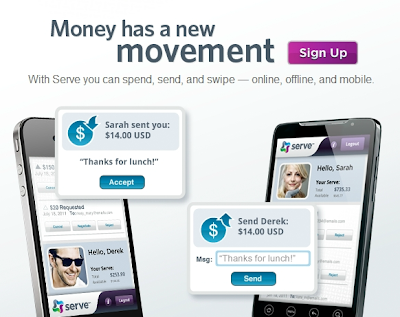
Thanks to American Express, I can have exactly what I wished for and more. The solution is called, Serve and it makes sending, receiving, and spending money easy to do. Did I mention it was FREE?

Through the web site and mobile app, I can load the account with money using my bank account, debit, and credit card. Once funded, it's a cinch to transfer resources from the main account to my kid's sub-accounts. From there, they can use a prepaid reloadable Serve card wherever American Express cards are accepted.

Other Uses  
As I peruse the service offerings on their site, I thought about other ways to use Serve. Below are a few ideas.

  • Sub-accounts for fraternity business - Committee chairs, or other organization representatives, may need to put down payments on facilities, purchase supplies for events, or take a trip on behalf of the organization. In these cases, a prepaid Serve Card would allow the Treasurer to put money on the card and not worry about individuals spending more than what is allocated.
  • Raise money for a podcast - Accepting donations in support of a podcast is made easier when there is a widget on the page. Listeners can trust the American Express name for its dedication to security.
  • Raise money for a worthy cause - Use a widget on your web site to accept donations for scholarships, cancer research, feeding the hungry, or any number of worthy causes.
  • Allowances - With kids, having an allowance is one way to offer financial resources while teaching proper money management.     
The ideas are endless and Serve seeks to help you meet your goals.

The Fine Print
 I know what you're thinking, because I was thinking it, too. All of that sounds great, but how much does it cost? What's the catch? How does Serve compare to PayPal? In this section, I'll attempt to answer a few of those questions.


  • Adding money - If adding money from a credit or debit card, adding money is instantaneous. However, if you add money from a bank account, it could take up to 5 business days. 
  • Sending and receiving money - To send and receive money, both parties must have a Serve account. Once in place, you can send money using their email address.
  • Subaccounts - If you're going to use the subaccount with children, please note that you only get four subaccounts and kids must be at least 13 years of age.
  • Fees and limits - For the most part, everything is free. You can transfer funds and purchase items without cost. However, the following actions may incur a fee:
    • ATM withdrawl - The first withdrawl each month is FREE, but after that it's $2.00 each time. This doesn't take into account any fees applied by the bank.
    • Funding the Serve account with a credit card - Using a credit card to add money will incur a 2.9% of amount transferred + $0.30 transfer fee.
    • Subaccounts - There is a one-time fee of $2.95 to setup a subaccount.
    • Funding limits - There is a limit of $100 per day from credit and debit cards and a $1,000 limit per day from a bank. Total funding per month is $2,500.
  • Serve vs. Paypal - For the most part, the two offerings are pretty close. However, there are a few differences. See below:
    • Pay by check - Paypal allows users to scan checks using a mobile device and then deposit that money into an account. Serve does not.
    • Rewards - Serve Cards do not offer rewards but Paypal does.
    • Credit card backing - Serve is backed by American Express and Paypal by MasterCard.
    • Subaccounts - Paypal offers a subaccount for kids aged 13-18 but Serve offers a subaccount for anyone over the age of 13.
Closing Thought
As a long time user of Paypal, although not extremely active, I like what Serve provides. Most importantly the subaccount idea.

As a father of three and president of my local fraternity chapter, the current offerings could serve quite beneficial to our needs. 

Please note that in writing this article, I am not yet an experienced user of either Paypal or Serve. Given more time, I'm sure I could render a more personal story about the pros and cons of each. Until then, I look forward to hearing from you and your stories. Let me know what you think in the comment section below.

Special Thanks to Danielle Baldwin for bringing this service to my attention.

Monday, December 13, 2010

Hey Kid, Get Your Hands Out Of My Pockets!


This morning, I read a blog post from The Family Wallet, entitled, "Mooching Kids?? How to Set Financial Limits." In this post, the author talks about how youngsters can grow up believing that parents are simply an extension of their own piggy banks. When the child runs out of resources, they turn to mom and dad for help.

Does this sound familiar?

In a recent article, Fatherhood: When To Start Teaching Life Lessons?, I talk about making that childhood transition from being cared for to caring for oneself. Financial responsibility and intelligence is a must for adults, but when should kids first begin this lesson?

Based upon my own experience, and child's maturity level, I found that my son reached this point at age 12. By the time he became twelve, my son was in middle school, transitioned into Boy Scouts from Cub Scouts, and was able to successfully demonstrate his ability to make his own meals, get dressed, and manage basic personal hygiene tasks alone. Although, he still needs a quality check from time to time.

As it pertains to personal finances, I found that my son recognized money, but had little understanding of its value. When things got broken or misplaced, he showed no signs of disappointment or loss. Instead, he expected his parents to simply replace it. No matter the cost.

This concerned me. For one, we don't have an unlimited amount of money, and two, I feared he would grow up with a feeling of entitlement. As if we owed him something.

To combat this issue, I thought to include the following tactics into my personal parenting arsenal:

  • Earn Your Keep: While providing food, shelter, clothes, and other necessities is a must, paying for school pictures, trips, toys, and games is not. Yes, they may be fun, educational, or just filled with good memories, but these types of things are extra. They are privileges, not a right! If the child is interested in partaking in these things, they need to earn it.

    "Earning" the extra stuff can be acquired through good behavior and personal savings. Instead of paying for a new Wii game outright, I will provide my son with work that pays. Assuming he starts soon enough (time management), does enough tasks (money management), and behaves, he'll be able to acquire or attend desired object/event.

  • Fines: As the Federal, State, or Local governments will do to us, we can impose financial fines for poor behavior or lack of quality control.

    One of the few chores my son is asked to do is wash dishes. His mother complains that he does a poor job of washing them and fears she might contract some disease as a result. To remedy this, the parent can deduct money from a paycheck in the form of fines. For every dirty dish, deduct $0.25, for example.

  • Job Description: As with any job, the child must understand what is expected of them and how much they will receive, if done right. To achieve this, simply create a written document that outlines the tasks and expected outcomes. By having it in writing, the job description will help minimize disputes when they arise. Trust me, they will arise.

  • Allowance Schedule: Similar to an adult pay day, kids will look forward to a regular and consistent schedule for receiving their allowances. Assuming all tasks were done according to their job description, pay them in full and allow them to manage their own money. Failure to have enough money for special events or toys means that Daddy or Momma will not "fill in the blanks."
These items are just a few ideas for communicating the value of money and financial responsibility. Although, I recognize this is not an exhaustive list. What ideas do you have? What do you find works really well in your house? Let me know in the comment section below.

Related Post
If you like what you've read, take this opportunity to subscribe to my RSS Feed and Newsletter.  However, don't forget to connect with me on Twitter, Facebook, LinkedIn, Google Buzz, Dailybooth, CinchCast, YouTube, or Friendfeed.

Damond L. Nollan, M.B.A.

Toll-free: (919) 912-9121
E-mail: Contact Me

Newsletter

Powered by Blogger.